Introduction
Working as an owner of a small business is quite similar to multitasking, as you should be doing sales in the morning, creating invoices in the afternoon, dealing with client messages at night, and even working on social media whenever you have an extra ten minutes to spend. Software won’t be able to manage everything for you, but there is definitely a chance to relieve yourself from repetitive tasks by using proper software. This is precisely what our Best SaaS Tools for Small Business Owners are supposed to provide in 2026.
At Toolbees, we have tested numerous platforms to see what kind of software is worth subscribing to for a small business team in order to justify spending on subscription. In this guide, we will discuss why having a proper SaaS stack is crucial now, what you should consider before subscribing to a service, and what tools should be used in your small business in 2026.
Why the Right SaaS Stack Matters for Small Businesses
Cloud-based business software has completely changed what a small team can accomplish without a big budget or a dedicated IT department. Your data lives online, your team can collaborate in real time from anywhere, and you're no longer one crashed hard drive away from losing everything. But the flip side of this is that there are now more tools available than any one business owner can reasonably evaluate alone.
Here's why picking the right Best SaaS Tools for Small Business Owners matters so much:
Time is your scarcest resource – as a small business owner, every hour spent on manual admin work is an hour not spent serving customers or growing the business
Tool sprawl gets expensive fast – it's easy to end up paying for six or seven overlapping tools that all do roughly the same thing
Customers expect fast, polished experiences – competing with larger companies means your communication and service need to feel just as responsive
Manual processes don't scale – what works when you have five customers breaks down completely at fifty or five hundred
Budgets are tight – small businesses need tools that deliver real value, not just impressive feature lists that go mostly unused
The goal isn't to adopt every trending tool you come across — it's to build a lean, well-integrated stack that actually gets used every day.
How to Choose the Right SaaS Tools for Your Small Business
Before subscribing to anything new, it helps to have a clear framework for evaluating whether a tool is genuinely worth adding to your stack. Before choosing from any SaaS tools list or AI tools directory, weigh these factors:
Does it solve a real, current bottleneck – Are you actually struggling with this task, or are you buying a tool because it sounds impressive?
Ease of use – As a small team, you don't have time for a steep learning curve; can you or your team actually get value in the first week?
Integration with your existing stack – Does it connect with the tools you already use, or will it create yet another disconnected system?
Pricing that scales with you – Look for flexible plans or free tiers that let you start small and grow into paid features as revenue increases.
Support quality – When something breaks, will you actually get help quickly, or are you on your own?
Long-term value vs. short-term appeal – Some tools look great in a demo but get abandoned within a month; prioritize what your team will actually use consistently.
With that framework in mind, here's our breakdown of the SaaS tools genuinely worth considering for a small business this year.
Best SaaS Tools for Small Business Owners in 2026
1. Google Workspace
Google Workspace continues to serve as the platform that underpins small business operations, with integrated capabilities such as email, document editing and collaboration, cloud storage, and video conferencing all packaged together in a trusted suite with a low learning curve.
Best for: Small businesses that need reliable email, docs, and file storage without a steep learning curve.
2. HubSpot CRM
Hubspot is one of the best free CRM solutions available today, giving you the option to track leads, build customer relationships, and conduct marketing automation for your business without any fees to pay at the outset. With additional paid hubs, more advanced automation and reports are offered without requiring a change of platforms as your sales and marketing needs evolve.
Best for: Businesses focused on sales and marketing that want a genuinely useful free CRM tier to start with.
3. QuickBooks
QuickBooks continues to be the top-rated accounting software for small business owners, and its AI-driven transaction categorization has made accounting much more convenient than ever before. Upon connection to the business bank account, QuickBooks imports and automatically categorizes almost all transactions, while marking up ambiguous ones.
Best for: Small business owners who want to eliminate manual bookkeeping and stay organized for tax season.
4. Xero
Xero presents a more modern version of QuickBooks with its user-friendly interface, making it another good choice for business owners. In addition to the cloud-based accounting, it provides excellent collaboration tools to work on the same live data in real-time alongside the accountant.
Best for: Small businesses wanting a modern, collaborative accounting platform for working closely with an accountant.
5. Mailchimp
Mailchimp is still one of the easiest email marketing platforms that offer audience segmentation, automation, and campaign analytics. The platform will be a perfect solution for companies that use newsletters or promotion campaigns as a way to reach out to clients.
Best for: Small businesses that need dependable email marketing without a steep setup process.
6. Mail Mint
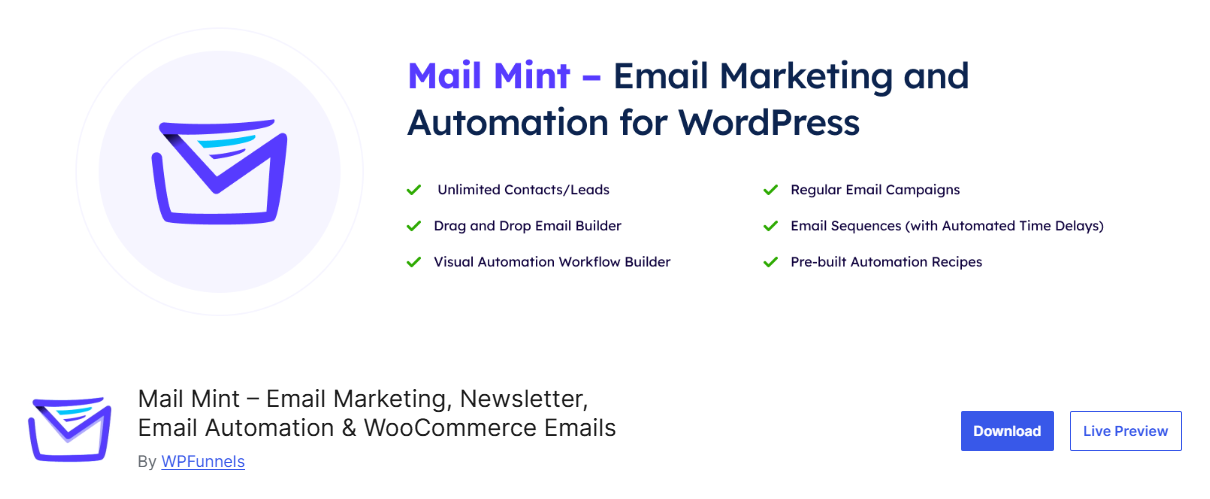
Mail Mintis an email marketing and automation platform for WordPress and WooCommerce that helps businesses manage contacts, send campaigns, and automate customer communication from their own WordPress dashboard. It is particularly useful for WooCommerce store owners who want to run targeted email campaigns and automated customer journeys without adding another separate marketing platform.
One of its standout features is the AI Email Engine. Users can describe what they want to achieve, and Mail Mint helps prepare the email campaign or automation workflow, including the email content, design, triggers, steps, and conditions. The setup can then be reviewed and adjusted before launching.
Best for: Small businesses running on WordPress or WooCommerce that want email marketing and automation managed directly from their website.
7. Canva
Canva is a must-have design tool for small businesses who do not have a designer. The platform makes it possible for everyone to create professional graphics, social media posts, and other marketing materials using pre-designed templates. Now Canva also has powerful AI tools that generate numerous design options and ideas in seconds.
Best for: Small teams that need polished visuals without hiring a designer for every request.
8. Zapier
Zapier automates tasks that would take too much time manually because they involve moving information between apps that do not naturally interact. This tool will come in handy when you start using multiple SaaS tools that need to get some of your data stored in different platforms.
Best for: Businesses running multiple SaaS tools that need to automatically sync data and trigger actions between them.
9. ClickUp
ClickUp is a powerful project management platform and one of the most popular choices among small teams. The tool offers all the functions needed: task tracking, documents, and collaboration in one app to prevent disconnection.
Best for: Small teams that want flexible project management without paying for a premium plan right away.
10. Hootsuite
Through Hootsuite, small business owners can manage all of their social media accounts through one platform where they can schedule a whole month of posts in one go and use analytics to know which posts work. Small business owners who actively use several different social media channels will definitely have some time saved every week when using the platform, even as much as ten hours per week.
Best for: Small business owners active on multiple social platforms who want to save significant time on content scheduling.
11. Zoom
Zoom is still the best video conferencing tool for small business owners because its AI scheduling can help find the best meeting times without going through the regular back and forth process. The platform offers a completely free package for most meetings and the affordable paid plan for more extensive meetings.
Best for: Small teams that run regular virtual meetings and want a tool that just works consistently.
Key Benefits of Building the Right SaaS Stack
Bringing it all together, here's what small business owners consistently gain from adopting the right combination of these tools:
Significant time savings – automating scheduling, bookkeeping, and social posting frees up hours every single week
Lower operating costs – many of these platforms offer free or affordable entry-level plans that fit a tight small business budget
More professional customer experience – polished design, prompt communication, and organized processes help small businesses compete with much larger companies
Better financial visibility – automated accounting tools reduce the chance of costly errors and last-minute tax season scrambling
Room to grow – most of these tools scale smoothly as your team and revenue expand, without forcing a disruptive platform switch later
If you're building out a broader set of productivity tools for your business, this combination of accounting, CRM, marketing, and collaboration platforms covers most of what a growing small business genuinely needs.
Common Challenges to Watch Out For
Building a SaaS stack isn't without its pitfalls, and a few things are worth keeping in mind before subscribing to too many tools at once:
Tool overlap – it's extremely common for small business owners to end up paying for six or seven tools that all do roughly the same thing
Subscription creep – free trials that quietly convert to paid plans can add up fast if you're not tracking what you're actually using
Integration gaps – if your tools don't talk to each other, you're back to manual data entry, defeating much of the purpose of going digital in the first place
Learning curve fatigue – adopting too many new tools at once can overwhelm a small team and lead to poor adoption across the board
The safest approach is usually to start with the two or three tools that solve your biggest current bottleneck, get genuinely comfortable using them, and add new tools gradually only when a real gap appears.
Building a Lean, Effective SaaS Stack for a Small Team
Picking individual tools is only part of the equation — the real value comes from how well they work together as a coordinated system. Here's a practical approach that tends to work well for small businesses:
Start with the essentials – communication, accounting, and a basic CRM cover the core operational needs of almost any small business
Layer in marketing tools once revenue is flowing – email marketing and design tools become more valuable once you have an audience worth nurturing
Automate connections between tools early – even a simple Zapier automation between your CRM and email tool can save meaningful time every week
Review your subscriptions quarterly – cancel anything that isn't genuinely earning its cost, and consolidate overlapping tools where possible
Prioritize tools your team will actually use – the most feature-rich platform is worthless if it sits unused after the first week
Small business owners who treat their software stack as a lean, deliberately built system — rather than a random collection of trending tools — tend to save both money and time, while avoiding the frustration of juggling too many disconnected platforms.
Where to Find More Tools as Your Business Grows
With growth, you will find yourself needing different software tools, and there is nothing wrong with having an option where you can compare new choices as they arise. The Software as a Service tools directory available at Toolbees spans everything, from AI tools online for free to use to more robust ones for scaling past a few employees for team founders. Be it about the best AI tools list to see what's new or comparing software categories, having a resource of choice saves you from going through vendor marketing pages alone.
A Realistic Monthly Budget for a Solo or Small Team
Some of the most frequently asked questions from small business owners are "how much should all this cost?" The truth is, a stack doesn't have to cost much at all in order to be effective, particularly when you're just getting started. An independent business owner could get their communication, accounting, marketing, scheduling, and automation needs handled for less than a hundred dollars per month, which is around the price of one hour of professional services.
Here's roughly how that budget tends to break down for a lean starting stack:
Communication and collaboration – Google Workspace or a similar suite typically runs a small monthly fee per user
Accounting – QuickBooks or Xero entry plans are usually priced affordably for a solo owner or very small team
CRM and marketing – HubSpot's free CRM tier and Mailchimp's starter plan can cover early-stage needs at little to no cost
Automation – Zapier's free or starter tier handles a surprising amount of connective work before you need to upgrade
Design – Canva's free tier covers most small business design needs, with Canva Pro adding value once brand consistency matters more
As revenue grows, most business owners find that upgrading a handful of these tools — rather than adding entirely new ones — covers the next stage of growth. The time saved from even a modest stack like this is usually measured in tens of hours per month, which makes the subscription cost essentially self-funding once you account for what that time is actually worth.
Signs It's Time to Upgrade or Add a New Tool
It's not always obvious when a free plan or a lightweight tool has stopped being enough. A few signals tend to show up consistently when it's genuinely time to upgrade:
You're hitting plan limits regularly – if you're constantly bumping into contact limits, storage caps, or user seat restrictions, the free tier is likely costing you more in workarounds than a paid plan would cost outright
Manual work is creeping back in – if you find yourself copying data between tools by hand again, that's usually a sign you need better integration or a more capable platform
Your team has grown past what one person can track – solo-friendly tools sometimes lack the collaboration features a growing team genuinely needs
Customers are noticing gaps – slow response times or inconsistent communication are strong signals that your current tools aren't keeping pace with demand
You're paying for workarounds – if you've built a patchwork of manual processes to compensate for a tool's limitations, it's often cheaper in the long run to upgrade than to keep patching around the gap
Small business owners who periodically check for these signals tend to upgrade their stack at the right moments — not too early, when the extra cost isn't justified yet, and not too late, when the lack of proper tools starts genuinely holding the business back.
Frequently Asked Questions (FAQs)
1. What are the best SaaS tools for small business owners just getting started? Google Workspace, HubSpot CRM's free tier, and QuickBooks cover the core essentials of communication, customer management, and accounting, making them a solid starting point before adding more specialized tools.
2. How many SaaS tools does a small business actually need? There's no fixed number, but most small businesses do well with a lean stack of five to eight core tools covering communication, accounting, CRM, marketing, and project management, rather than a dozen overlapping platforms.
3. Are free SaaS tools good enough for a small business, or do I need to pay right away? Many platforms, including HubSpot CRM and ClickUp, offer genuinely useful free tiers that work well for small teams, so it's often smart to start free and upgrade only once you hit a real limitation.
4. How do I avoid paying for tools I don't actually use? Review your subscriptions quarterly, track which tools your team genuinely opens and uses regularly, and cancel anything that isn't clearly earning its monthly cost.
5. Should I choose an all-in-one platform or separate specialized tools? It depends on your needs — an all-in-one platform can simplify billing and reduce integration headaches, but specialized tools often go deeper on the one specific job you need done well, so the right choice depends on how complex your requirements are.
Final Thoughts
Small businesses in 2026 don’t have to do everything by hand but rather have to identify the select few tools which will actually make their lives easier, speed up processes and help them focus on scaling the business and not getting lost in all administrative tasks. The Best SaaS Tools for Small Business Owners mentioned in this article include a variety of tools from accounting and CRM, through marketing and design and down to collaboration tools.
Select those tools which address the most immediate challenges that you face now, keep adding to your tool arsenal only when necessary and evaluate your software stack from time to time to eliminate any unnecessary subscriptions. To learn about more SaaS tools check out our SaaS tools directory and the list of best AI tools at Toolbees.